
Teaching & Learning
Plan, teach and keep everyone on the same page
Teaching & Learning in Cosmo School ERP
Teachers submit weekly lesson plans for the head's approval and post the daily diary of classwork and homework, which parents and students see the same evening. Assignments, notes, PDFs, video lectures and online class links live in one place. Staff tasks move across a Kanban board, so the head always knows what is pending.
Key benefits
Planned teaching
Lesson plans are reviewed and approved before the week starts.
Homework parents can see
The daily diary reaches parents and students in the app.
Clear staff tasks
Assign, track and close tasks with checklists and due dates.
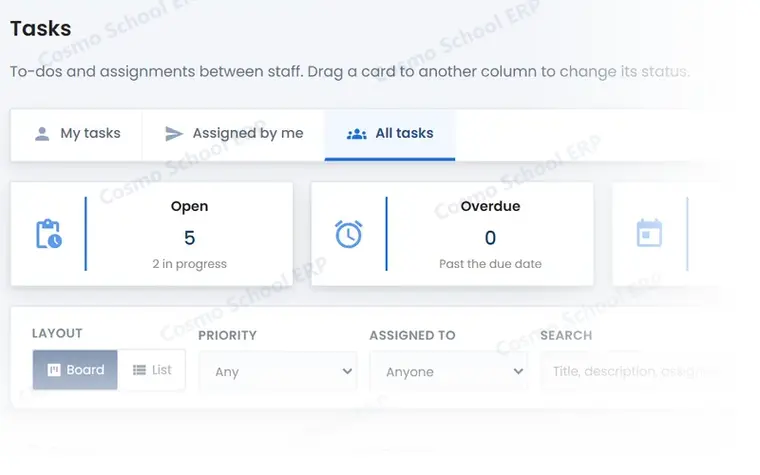
A partial view of the screen
This is part of a real Teaching & Learning screen in Cosmo School ERP, shown with test data. In the free demo we open the complete screens and walk through each step with you.
Everything in Teaching & Learning
Classroom 6
- Lesson plansWeekly plans with objectives, approved or returned by the head.
- Class diaryDaily classwork and homework per subject, published to parents.
- AssignmentsSet assignments, receive submissions and mark them.
- Study materialNotes and PDFs shared with a class.
- Video lecturesRecorded lessons organised by subject.
- Online classesScheduled online classes with joining links.
Staff work 3
- Task Kanban boardTo do, in progress, done: drag tasks between columns.
- Checklists and commentsBreak tasks into steps and discuss them in one place.
- Teacher dashboardToday's timetable, sections, pending attendance and tasks.
Related modules
Examinations
Exams, date sheets, marks, results, report cards, admit cards, question bank and paper generator.
14 featuresExploreAcademics
Classes, sections, subjects, allocations, timetable, rooms and academic calendar.
10 featuresExploreStudent Life
Photo gallery, achievements, hall of fame and Learn 'n' Fun educational games.
8 featuresExploreCommunication
Notices, SMS and email broadcast, notifications, push, messages, surveys and tickets.
11 featuresExploreWant to see Teaching & Learning live?
Book a free demo and we will show this module with data like your own school's.