
Hostel in Cosmo School ERP
Set up each hostel with its rooms and beds and see occupancy on a visual bed map. Allocation checks gender and capacity, and the hostel fee is added to the monthly challan automatically. Wardens take the night roll-call, issue outing and leave passes, record visitors and publish the weekly mess menu, while parents can see their child's room and passes.
Key benefits
Visual bed map
Free and occupied beds for every room at a glance.
Safe allocations
Gender and capacity rules are checked automatically.
Night roll-call
Wardens mark presence room by room every night.
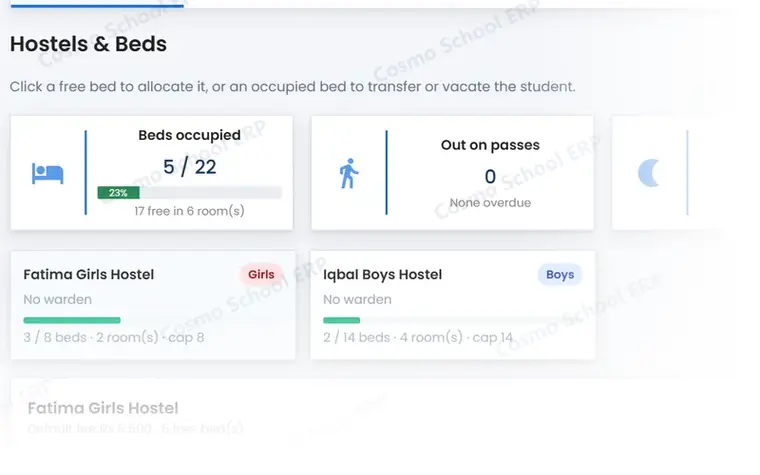
A partial view of the screen
This is part of a real Hostel screen in Cosmo School ERP, shown with test data. In the free demo we open the complete screens and walk through each step with you.
Everything in Hostel
Rooms and residents 4
- Hostels and roomsBoys, girls or mixed hostels with rooms, floors and beds.
- Bed mapOccupancy view of every bed in every room.
- Bed allocationAllocate, transfer and vacate with gender and capacity checks.
- Hostel feeMonthly hostel fee on the student's challan.
Daily life 5
- Night roll-callRoom-by-room presence each night.
- Outing and leave passesIssue passes and record the return.
- Visitor logWho visited which resident, and when.
- Mess menuWeekly menu for breakfast, lunch and dinner.
- Hostel reportsOccupancy, absences and passes.
Related modules
Fees & Finance
Fee structures, challans, collection desk, defaulters, follow-ups, reminders and online payment.
13 featuresExploreAttendance
Daily student and staff attendance, biometric devices, face and card kiosks, registers.
12 featuresExploreAdmissions & Students
Enquiries, online applications, entry tests, admission wizard and student records.
18 featuresExploreWant to see Hostel live?
Book a free demo and we will show this module with data like your own school's.